Configuration
Freetvarr reads settings from two places. Freetvarr's .env, next to its Docker compose file, holds deploy settings. You set everything else (the TVHeadend URL and login, the Plex token, the schedule) in Freetvarr's Settings page in a browser.
Compose environment
Set these in the .env alongside docker-compose.yml. After a change, run docker compose up -d in a terminal in that folder to restart the Docker containers with the new values. Every value is optional:
| Variable | Purpose |
|---|---|
CONFIG_PATH | Optional. Host folder for the two Docker containers' config (default ./config); Freetvarr's database lives in ${CONFIG_PATH}/freetvarr |
DATA_PATH | Optional. Host folder (default ./data) that holds recordings/ (TVHeadend's output), media/tv (your TV library), and media/one-offs (recordings with no series folder), and nothing else. One shared mount explains why |
PLEX_PREFS_PATH | Optional. Path to Plex's Preferences.xml, used by the Auto-detect token button, for a Plex you installed yourself on the same computer; omit otherwise |
COMPOSE_PROFILES | Optional. plex adds the Plex service to docker compose up -d (No Plex yet?) |
PLEX_CLAIM | Optional, plex profile only. The claim code from https://plex.tv/claim, which signs the new Plex in to your Plex account. A code expires 4 minutes after you get it |
CSRF_SECRET | Optional override. Freetvarr otherwise generates a secret on first start and saves it to ${CONFIG_PATH}/freetvarr/csrf-secret. See CSRF secret |
TZ | Optional IANA timezone (e.g. Australia/Sydney). Pre-fills Freetvarr's time zone in the wizard; a zone chosen in SETTINGS wins over it. Applies to TVHeadend when set. TVHeadend otherwise follows the host clock |
PUID/PGID | Optional. UID and GID to run as (default 1000). Set your own user, or the files show an unknown owner in the host's file manager. Both Docker containers use the same pair |
FREETVARR_PORT | Host port to serve on (default 3733) |
TVH_URL | Optional. Fixes the address AUTO-DISCOVER TVHEADEND offers; omit to let Freetvarr probe port 9981 on the host |
LIVE_TV_MAX_SESSIONS | Optional. How many channels the live TV player streams at once (default 2) |
LIVE_TV_BUFFER_MINUTES | Optional. How many minutes of live TV the player can pause and rewind (default 30, 0 turns it off, maximum 120) |
LIVE_TV_TRANSCODE | Optional. How live TV handles H.264: auto (default), hardware, software, or copy |
LIVE_TV_VAAPI_DEVICE | Optional. The render device for hardware encoding (default /dev/dri/renderD128) |
IMAGE_CACHE_MAX_MB | Optional. Megabytes of resized guide images and channel logos kept in ${CONFIG_PATH}/freetvarr/image-cache (default 100); the least recently shown go first |
RENDER_GID | Only with docker-compose.override.yml. The group ID that owns the render device |
CSRF secret
Freetvarr signs its CSRF cookie with a secret. On first start, with CSRF_SECRET unset, it generates a random secret and saves it to the file csrf-secret in its config folder (/config/csrf-secret in the container, ${CONFIG_PATH}/freetvarr/csrf-secret on the host). Only the Freetvarr user can read the file. Later starts reuse it. A CSRF_SECRET in your .env overrides the file.
If the config folder is not writable, Freetvarr exits with a message to check that CONFIG_PATH is owned by PUID:PGID. To replace the secret with a new one, delete the file and restart Freetvarr. Freetvarr generates a new secret at the next start, and browsers get a fresh CSRF token automatically.
The two recordings paths
Freetvarr keeps two settings for one folder. These are the settings most likely to be wrong:
- Recordings root (
recordings_root;/recordingsin the code,/data/recordingsin the example Docker compose file) is where Freetvarr sees TVHeadend's files, inside the Freetvarr Docker container. - TVHeadend recordings path (
tvh_recordings_path, default/recordings) is the path TVHeadend reports in the filenames it hands out, inside the TVHeadend Docker container.
In the example Docker compose file, TVHeadend mounts ${DATA_PATH}/recordings at /recordings, and Freetvarr mounts ${DATA_PATH} at /data. TVHeadend reports /recordings/... and Freetvarr sees the same file at /data/recordings/..., so the two settings differ and you never touch them. Freetvarr rewrites every TVHeadend filename from the second path to the first. Freetvarr skips a file outside that prefix and adds a note saying so.
The third path, media root (media_root; /media/tv in the code, /data/media/tv in the example Docker compose file), is where Freetvarr files finished episodes for your media library.
The one-off folder
The one-off folder (oneoff_root; /media/one-offs in the code, /data/media/one-offs in the example Docker compose file) holds recordings that match no series folder. On the host it is ${DATA_PATH}/media/one-offs. Create the host folder first, owned by PUID:PGID. If the folder is missing, these recordings show as SKIPPED with a note.
The optional movies folder (movies_root, or MOVIES_ROOT) takes films with no series folder. Leave it empty to send films to the one-off folder. It must sit inside the same shared mount as the recordings, for example /data/media/movies.
IMPORT EVERY RECORDING, under LIBRARY RULES in SETTINGS → STORAGE, turns the one-off folder on or off. With it off, Freetvarr imports only recordings that match a series folder, or that you recorded with ADD TO LIBRARY on. To have Plex refresh the one-off library after an import, choose it as the PLEX ONE-OFF SECTION; for films, choose the PLEX MOVIES SECTION.
One shared mount
Keep the recordings and your library inside one folder, mounted into the Freetvarr Docker container once. Freetvarr then imports each recording instantly and uses no extra disk space. If they sit in two separate mounts, Freetvarr copies every recording instead, which is slower and takes twice the space.
The example Docker compose file does this. It mounts ${DATA_PATH} once, at /data, and the recordings, the TV library, and the one-off folder are all folders inside it:
    volumes:
      - ${DATA_PATH}:/data
    environment:
      - MEDIA_ROOT=/data/media/tv
      - ONEOFF_ROOT=/data/media/one-offs
      - RECORDINGS_ROOT=/data/recordings
      - TVH_RECORDINGS_PATH=/recordings
Keep only recordings/ and media/ in ${DATA_PATH}. Freetvarr can write to everything in the mount.
If your folders live in separate places, mount one parent folder that holds both, or move them under one. The Doctor Hardlinks check tells you whether imports are instant or copied.
For the technically minded: Freetvarr imports with a hardlink (a second name for the same file), and Linux refuses a hardlink across two mounts with the EXDEV error.
When you change media_root or oneoff_root, Freetvarr moves the stored file paths on startup and when you save Settings. You do not edit the database.
Runtime settings
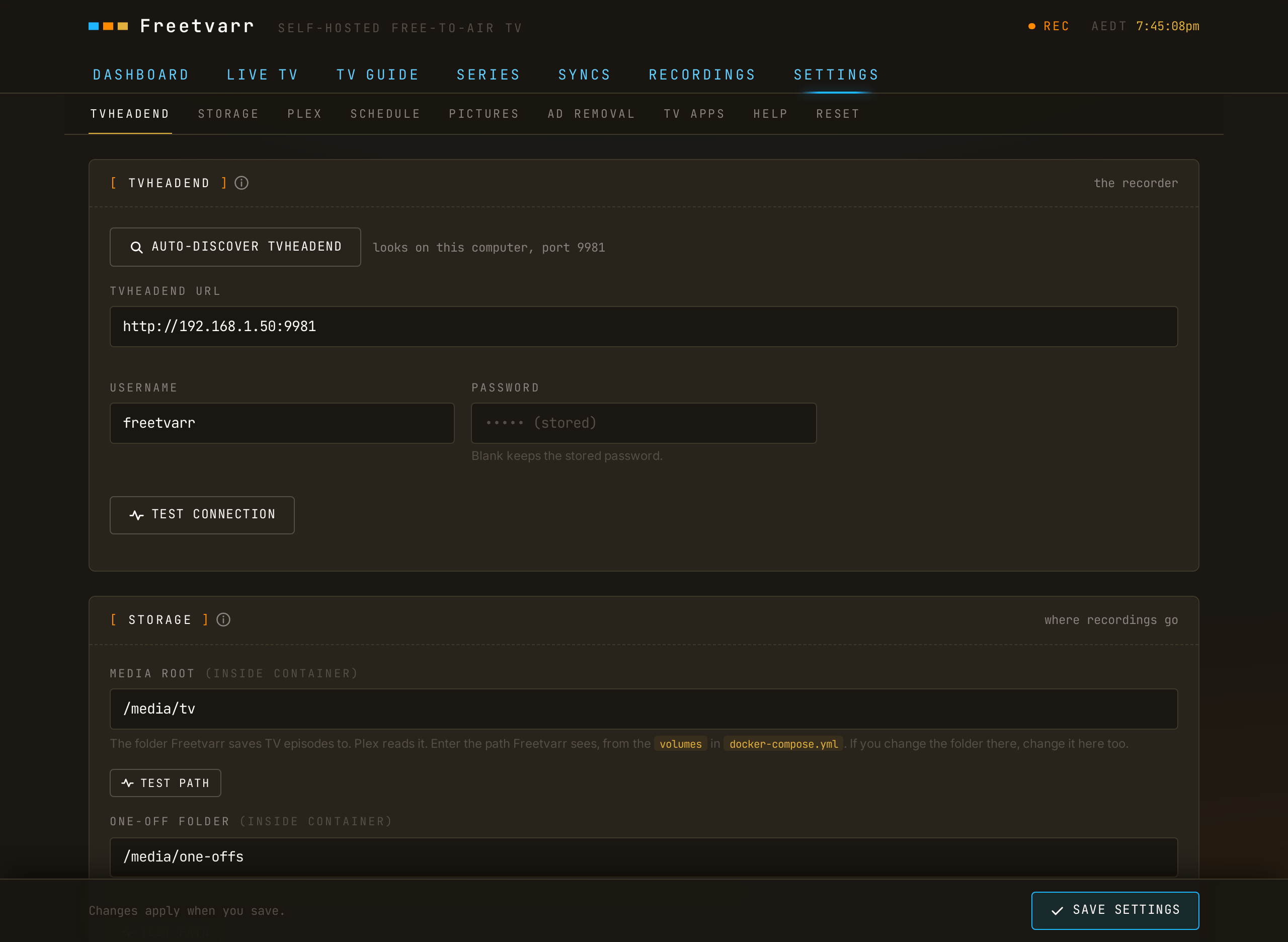
The TVHeadend URL, username, and password, the Plex URL, token, and section, the storage paths, the ad-removal switches, and the sync schedule are all set on Freetvarr's SETTINGS tab (or in its first-run wizard) and stored in Freetvarr's database. The bar under the tabs on SETTINGS jumps to each part: TVHEADEND, STORAGE, PLEX, SCHEDULE, PICTURES, AD REMOVAL, HELP, and RESET. Press SAVE SETTINGS to keep your changes. TEST PATH checks the media root and Freetvarr's recordings folder, and CHECK TVHEADEND reads TVHeadend's recording path from its DVR profile and compares it with yours.
NOTE
MEDIA_ROOT, ONEOFF_ROOT, RECORDINGS_ROOT, TVH_RECORDINGS_PATH, and PLEX_PREFS_PATH also act as defaults for their matching runtime settings. Freetvarr uses the value in SETTINGS first, then the environment variable, then the built-in default.
The full environment reference, including container-side variables like DB_PATH, PORT, and NODE_ENV, is in the deep dive.