For you
For you suggests programmes from the next 7 days of the TV guide, based on what you record and watch. Freetvarr works out the suggestions on the computer that runs it. Your viewing history never leaves that computer.
Suggestions show in three places:
- The For you row on Home.
- A For you slide in the highlights on Home.
- The For you page. Press See all, the row title, or the last tile of the row on Home to open it. On a tablet or computer, For you in the rail (the menu down the left side; see Navigation) opens it too.
The For you page
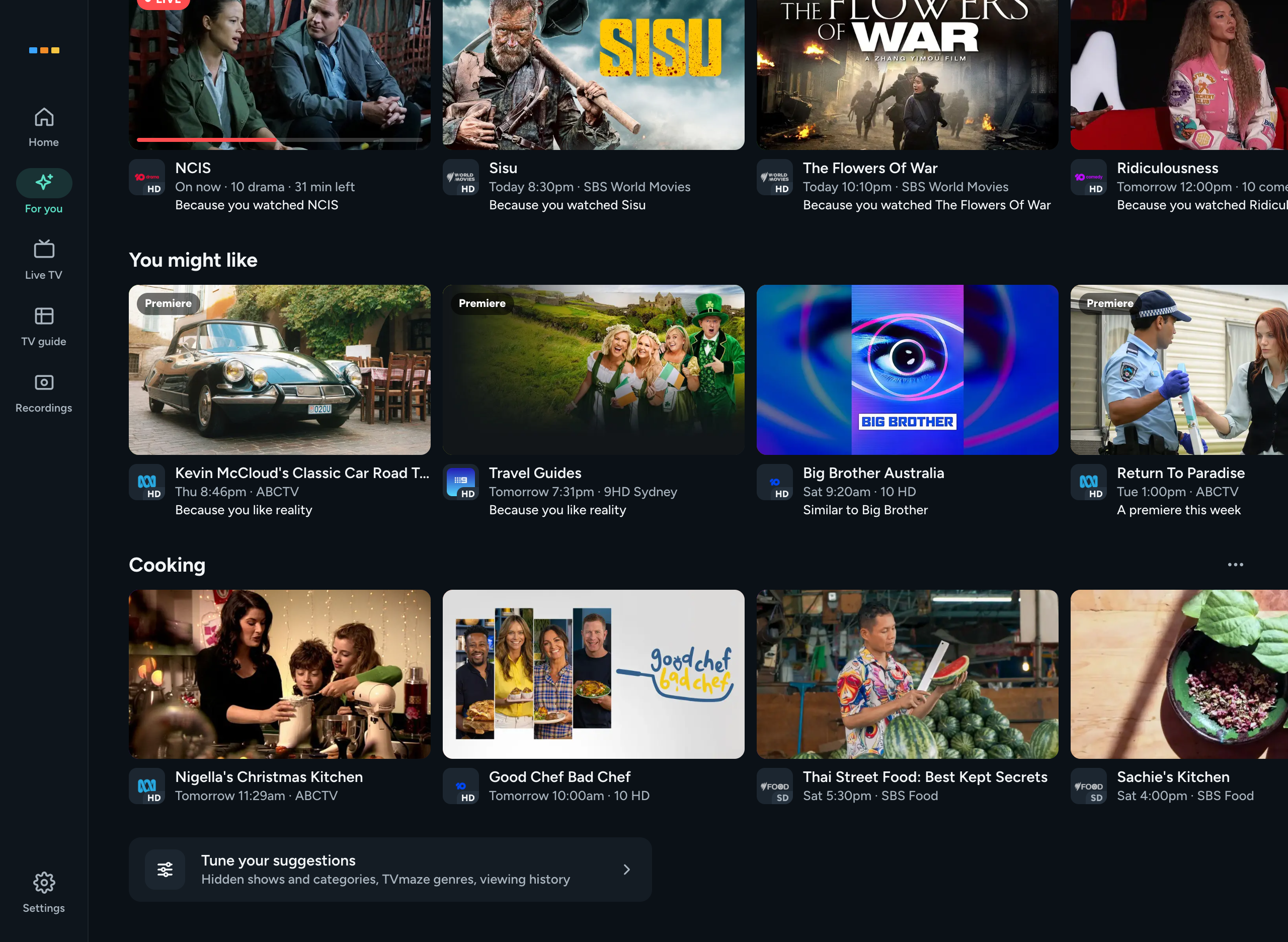
The page groups its suggestions under these headings, in this order, and leaves out any heading with nothing in it. Each heading shows up to 12 cards. A show appears under the first heading that fits it only.
- Ready to watch: one card for each show with recordings you have not watched yet. The card shows the oldest of those episodes. A recording counts as watched when you finish it in Freetvarr, or when Plex marks it watched.
- Finish what you started: shows you watched 1 to 3 episodes of in the last 60 days, with the next episode this week.
- Coming up this week for you, sorted by air time.
- One seasonal row in the days around an occasion, such as Christmas or Anzac Day. See Seasonal rows.
- New seasons and returning.
- Movies worth recording tonight: films that start between 5pm and 3am, ranked by how well they fit what you watch and, with a TMDB key, by their user score on TMDB (The Movie Database, an online film database).
- You might like.
- Up to three category rows and one sport row, such as Cooking, Home and property, or AFL. See Category rows.
- Top rated series this week: drama, comedy, animation, and documentary series in the next 7 days with a user score of 7 or more out of 10 on TVmaze, a free online database of TV shows. A show must be popular enough on TVmaze for the score to count, and Freetvarr must be sure it found the right show: when two shows share a title, such as the US and UK versions of Ghosts, it shows no score. It needs no key. With Ratings or Genres off, the row is left out. Each card shows its TVmaze score, and the TVmaze link beside the heading opens TVmaze.
- Top rated movies this week: up to 10 films from the next 7 days with the best user scores on TMDB, weighted by the number of votes, so a film with a few high votes does not beat a film with thousands. It needs a TMDB key and leaves out films you have watched or marked Fewer like this. Each card shows its TMDB score.
- Movies for you.
- Premieres and movies this week.
A suggestion you have already scheduled carries a Recording badge and goes to the end of its row. A programme on now carries a LIVE badge.
Press a card to act on it. What happens depends on the suggestion:
- Ready to watch: plays the episode. If the file does not play, it opens the show page.
- On now: plays the channel live.
- Already scheduled: opens the show page.
- A new season or a returning show: opens the programme sheet with Every episode picked.
- A premiere or a new show: opens the programme sheet with Every episode picked, or This episode for a movie.
- Anything else: opens the programme sheet with This episode picked (This movie for a movie, This showing for a one-off).
Press ⋯ on a card (or hold the card on a touch screen) for more choices:
- Play, Watch live, Record this episode, Record series, Go to show, and Programme info, where they apply. For a movie, the menu reads Record this movie and has no Record series. For a one-off programme it reads Record.
- More like this: tells Freetvarr that you like the show, so shows like it count for more.
- Fewer like this: lowers the show and the shows like it, by kind of show and by how close their descriptions are. The show is not hidden. The effect is strongest at first and halves every 60 days. A message says
You'll see fewer shows like this; press Undo on it, or press Fewer like this again on the same card, to take it back. - Hide this show (Hide this film for a film): hides it from For you and the Home highlights for 90 days.
- Hide with the kind of show, such as Hide cooking shows or Hide Christmas shows: on cards with a category only. It does the same as Hide in the row menu; see Category rows and Seasonal rows.
- Not a movie or This is a movie: corrects how Freetvarr lists the programme. See TV guide.
- Why this?: lists the reasons for the suggestion, such as a genre you watched or a channel you often watch at that time.
The reason under a card names how you came to the show:
| Reason | What it means |
|---|---|
| Because you watched a show | You watched at least 10 minutes, or a quarter, of an episode. Watching most of an episode counts most. |
| Because you recorded a show | You recorded it, or asked Freetvarr to record it. |
| More like a show | You pressed More like this on it. |
| Because you like a genre | Most of what you watched and recorded is in that genre. |
Only time you spend watching counts: the Freetvarr page is on screen and the picture plays, with or without sound. A hidden tab or a paused picture does not count. In Multiview with more than one picture, a picture counts only when it has the sound or shows captions. Time on a live channel counts towards each programme by the minutes you watched of it. Opening a programme's details counts a little towards a show, but never gives a reason on its own.
Category rows
A category row collects programmes of one kind that you record and watch a lot, such as cooking shows or police shows. Each show gets one format, such as Reality or Drama, up to two topics, such as Cooking or Travel, and the country it comes from. For example, a renovation competition is under Reality and Home and property. The country is stored for later releases and makes no row yet.
Freetvarr takes each label from the first source that has one, in this order:
- Your own choice, from Change categories.
- A list of known free-to-air shows that comes with Freetvarr. It names the categories of about 600 shows that air in Australia and New Zealand, and it applies in every country. It is rebuilt before each minor release.
- Genres from TVmaze and Wikidata. Freetvarr looks these up in the background. The lookups need no account or key.
- Words in the title, the guide category, and the genre code the channel sends.
- At the Standard and Plus suggestion levels, a match of the show's description to each topic. This gives a topic only, never a format, a sport, Fishing, or Shopping.
Documentaries needs a strong source: the known-shows list, a Wikidata documentary genre, or a guide category or genre code that says documentary. A TVmaze type of documentary alone is not enough.
These are the categories:
- Formats, scripted: Comedy, Drama, Crime drama, Soap operas, and Sci-fi and fantasy.
- Formats, unscripted: Reality, Quiz and game shows, Documentaries, Lifestyle, Talk shows, and Panel shows. Lifestyle is for magazine shows that mix home, food, travel, or health, such as Better Homes and Gardens; a show about one subject, such as a cooking show, takes that topic only.
- Topics, in A to Z order: Antiques, Business and money, Cooking, Dating, Engineering and machines, Entertainment news, Fishing, Gardening, Health, History, Home and property, a row about life in your country (such as Life in Australia or Life in the United Kingdom), Medical, Military and war, Motoring, Music and arts, Mystery and paranormal, Nature and animals, Police and rescue, Politics and current affairs, Science and technology, Travel, and True crime. Life in Australia is for shows about Australian life and people, not for every show made in Australia. Freetvarr finds the country from the time zone in Settings → SYSTEM → Schedule.
- Sport: one row per sport, named by the sport, not by a league, in A to Z order: American football, Australian rules, Baseball, Basketball, Combat sports (with UFC and boxing), Cricket, Cycling, Football (soccer), Golf, Greyhound racing, Horse racing (with harness racing), Ice hockey, Motorsport, Netball, Rodeo (with bull riding and campdrafting), Rugby league, Rugby union, Surfing, Swimming (with diving), and Tennis. Football is Football (soccer) in Australia, Soccer in the United States and Canada, and Football elsewhere. Leagues, competitions, and shows about a sport go in its row, so the NRL, the NRLW, and State of Origin are all Rugby league. A sport show goes in a sport row only when its title, its channel name, or its guide category names the sport. A sport show that names no sport, such as a general sports panel show, goes in no sport row.
When you watch more than one sport a lot, they share one row, Sport this week. News, kids' programmes, shopping, and religious programmes never get a row. Award nights, song contests, and concerts are shows under Music and arts, not films.
A category row shows when at least 4% of what you recorded and watched in the last few months is in that category, from at least three shows (one is enough for a sport), and at least four other programmes in that category air in the next 7 days. Recent viewing counts most. Recording an episode counts more than watching it. Watching counts more than opening its details. Each episode counts once, however many times it airs, and one show alone cannot make a category (except a sport). News bulletins do not count towards the share.
A category row leaves out the shows you already record or watch, as these show under the headings above it. A show appears in one row only. A category row is left out when most of its programmes are already under earlier headings. The sport row lists each match: live and upcoming matches first, then shows about the sport, such as magazine and panel shows, and replays, highlights, and classic matches last. It shows up to three airings of one title.
Press ⋯ beside the title of a category row or the sport row for these choices:
- More and the category, such as More Cooking: makes the category count half as much again towards its row. Press Undo on the message to take it back.
- Hide with the kind of show, such as Hide cooking shows: hides the row and those shows for 90 days. The message says
Cooking shows are hidden for 90 days. After that, the category counts as before. Press Undo on the message to bring the row back, with any More you chose before. Pressing More later also brings the row back.
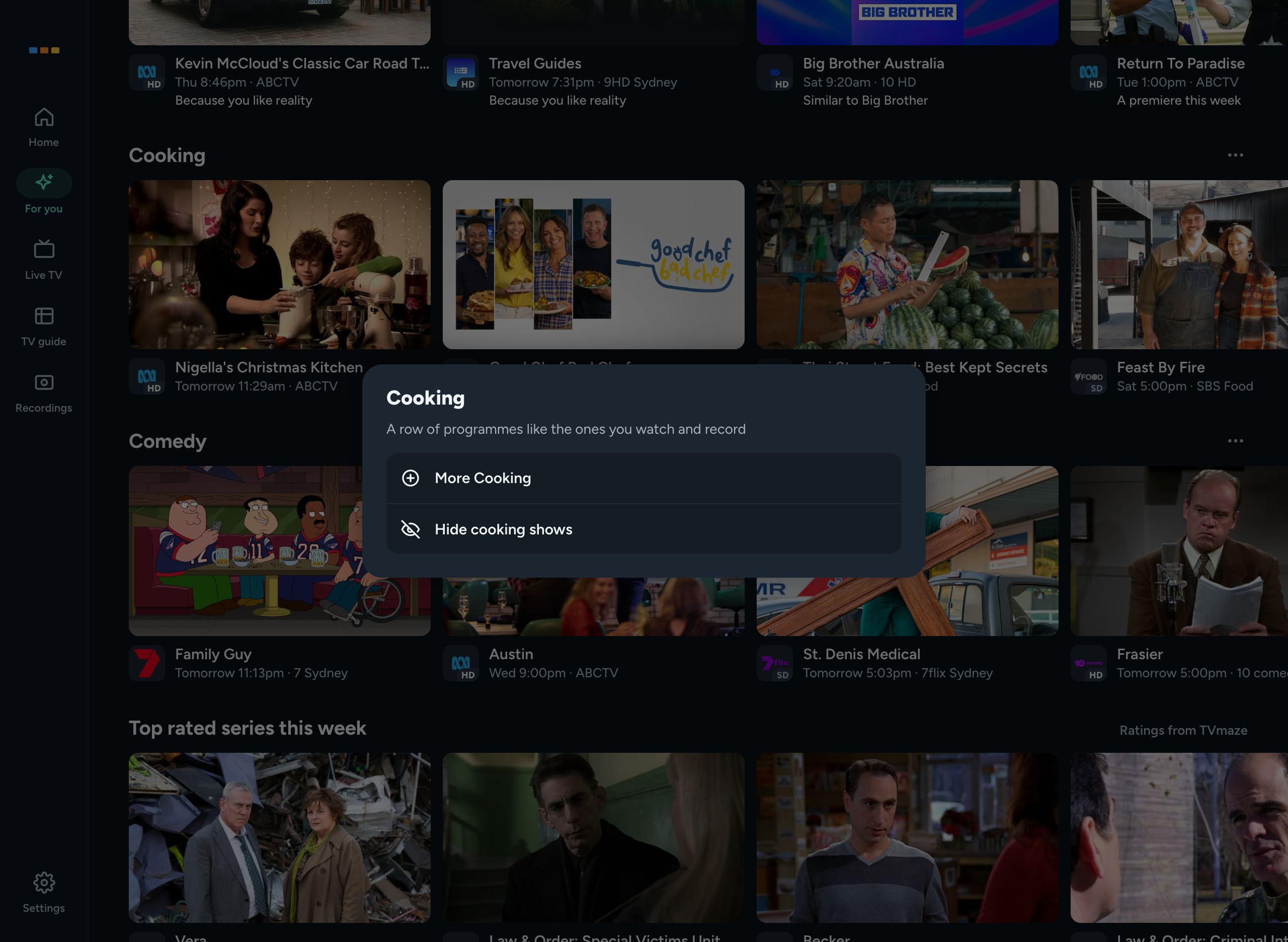
On a card in a category row, Hide names that row's category, the same as the row menu. Elsewhere, such as on the Home hero and in the programme details, Hide names one category of the show: the sport, else the main topic, else the format. A show is left out of the category rows and the Home hero when any of its categories is hidden.
To turn a category off before it ever shows, or to turn a hidden category back on, open Categories in the For you settings.
At the Basic suggestion level, Freetvarr files shows by their titles and genres only, so you can get fewer category rows.
Change categories
When Freetvarr files a show under the wrong categories, choose your own. Press ⋯ on a card in For you or on the Home hero, or ⋯ on the show page, and choose Change categories. Films have no categories, so the item does not show for a film.
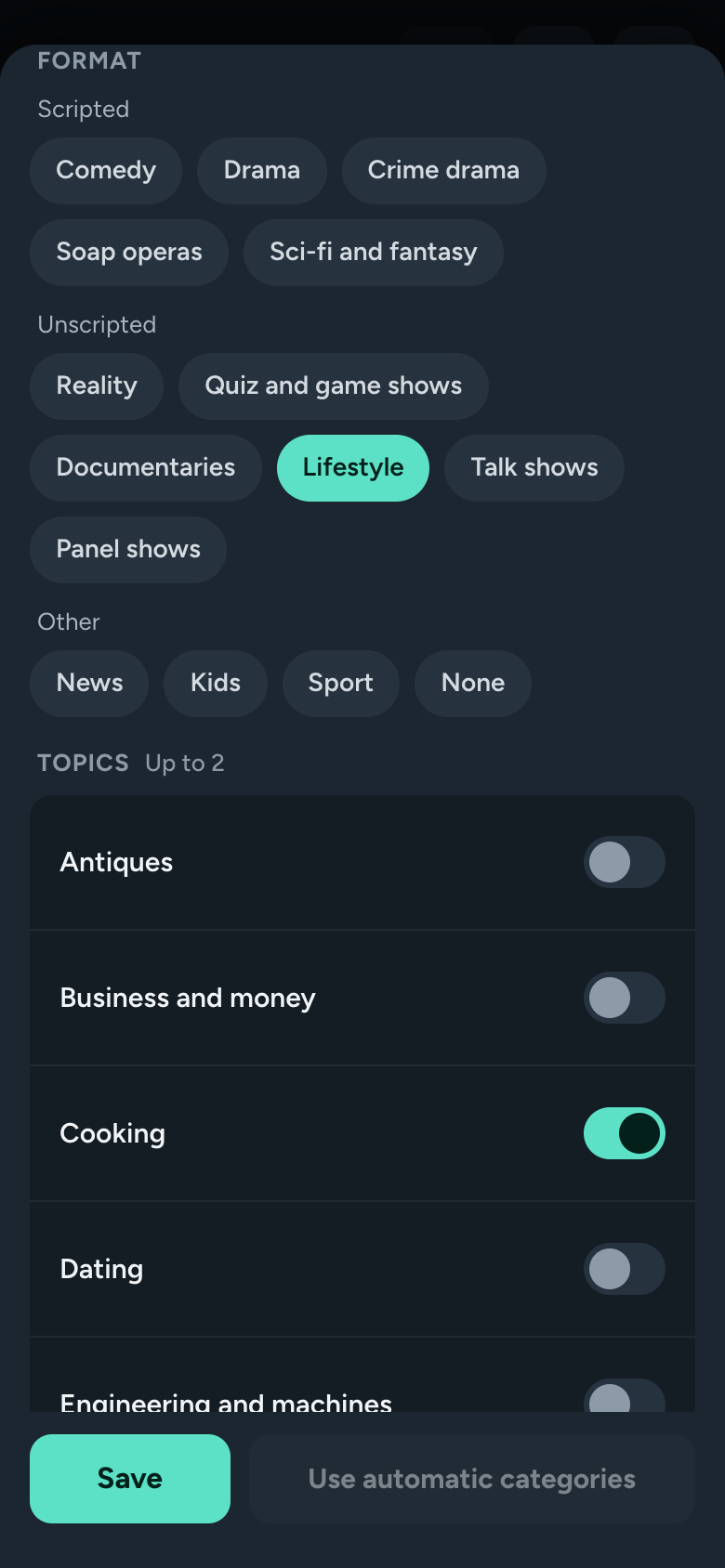
The sheet has these parts:
- Format: one format, in the groups Scripted, Unscripted, and Other. Other has News, Kids, Sport, and None. News and Kids make no row. A show that Freetvarr files under a sport, such as Rugby league, has the format Sport.
- Topics: up to two topics. When two are on, turning on a third turns off the one you turned on first.
- Sport: shows in place of Topics when the format is Sport. Choose one sport, such as Cricket; Other sport is last. The show then goes in that sport's row. Choose another format to take the show out of the sport rows; Topics comes back.
- Origin: the country the show comes from, and where Freetvarr found it, such as
Made in Australia (TVmaze). You cannot change it here.
Press Save to keep your choice. Your choice comes before every automatic source, and For you builds its rows again with it. The country still comes from the automatic sources. To go back to the categories Freetvarr chose, open the sheet again and press Use automatic categories.
Seasonal rows
A seasonal row collects the programmes about an occasion in the days around it, such as Christmas specials in December. It does not depend on what you record and watch, so a new household gets it too. For you shows one seasonal row at most, under Coming up this week for you.
The occasions depend on the country of the time zone in Settings → SYSTEM → Schedule. With no known country, you get the occasions for all countries only.
The table lists the occasions in date order for Australia. Settings → For you → Categories lists them in date order for this year in your country, so some rows move: Father's Day comes in June in the United Kingdom and the United States, and in September in Australia and New Zealand.
| Occasion | Countries | The row shows |
|---|---|---|
| Waitangi Day | New Zealand | From 3 days before to 6 February |
| Lunar New Year | All | From 5 days before to the day after |
| Eid al-Fitr | All | From 5 days before to the second day of Eid |
| Easter | All | From Palm Sunday to Easter Monday |
| Anzac Day | Australia and New Zealand | From 22 to 25 April |
| Mother's Day | Australia, New Zealand, the United Kingdom, and the United States | From 3 days before to the day. In the United Kingdom, the day is Mothering Sunday, three weeks before Easter Sunday |
| Fourth of July | The United States | From 1 to 4 July |
| NAIDOC Week | Australia | From the first Sunday in July to the next Sunday |
| Matariki | New Zealand | From 7 days before to the public holiday |
| Father's Day | Australia, New Zealand, the United Kingdom, and the United States | From 3 days before to the day: the first Sunday in September in Australia and New Zealand, the third Sunday in June elsewhere |
| Halloween | Australia, New Zealand, the United Kingdom, and the United States | From 24 to 31 October |
| Diwali | All | From 5 days before to the day after |
| Bonfire Night | The United Kingdom | From 1 to 5 November |
| Remembrance Day | Australia, New Zealand, and the United Kingdom | From 3 days before to 11 November. In the United Kingdom, the day is Remembrance Sunday, the second Sunday in November |
| Thanksgiving | The United States | From 7 days before to the fourth Thursday in November |
| Hanukkah | All | From the evening before the first day, through the 8 days |
| Christmas | All | From 1 to 26 December |
| New Year's Eve | All | From 27 December to 1 January |
Freetvarr works out most dates itself. The dates of Lunar New Year, Eid al-Fitr, Hanukkah, Diwali, and Matariki come from a table for 2026 to 2040.
Freetvarr checks each airing on its own, so a Christmas episode of a series counts and the other episodes do not. An airing counts when its title or episode title names the occasion, such as Christmas or Santa. An airing also counts when its description names the occasion with two different words, such as Diwali and Deepavali. The words festival of lights count as a second word for Diwali or Hanukkah, never on their own. At the Standard and Plus suggestion levels, a description match must also be close in meaning to a short description of the occasion.
These never count:
- Programmes on shopping channels.
- Sport.
- News programmes whose description names the occasion.
Christmas in June,Christmas in July, andEaster Island.- Kids' programmes, for Anzac Day, NAIDOC Week, and Remembrance Day only.
The row needs at least four programmes from at least three shows, all on or before the last day of the row. It shows up to two airings of one show. It leaves out the shows in the rows above it, and the rows below it leave out its shows. When two occasions overlap, such as Hanukkah and Christmas, the row is for the occasion with the nearest date. If that occasion has too few programmes, the row is for the other.
Press ⋯ beside the title of a seasonal row for Hide with the occasion, such as Hide Christmas shows. The row then stays hidden until the next time the occasion comes round, and the message says Christmas shows are hidden until next Christmas. Press Undo on the message to bring the row back.
To turn an occasion off, or to turn a hidden occasion back on, open Categories in the For you settings and use the Seasonal group.
Getting started
Freetvarr needs to know about at least five shows before it makes personal suggestions. A show counts once you have recorded it, watched at least 10 minutes of an episode, asked to record it, or pressed More like this on it. Until then:
- The Home row is called New this week, and lists premieres and films from the TV guide.
- The For you page asks you to Pick a few shows you like from this week's TV guide. This is optional. Press the posters you like, then Done. Press Skip to hide the question for a week.
How it works
Freetvarr scores each programme in the next 7 days of the TV guide against what you have recorded and watched. It looks at:
- The genres of the shows you like. Freetvarr looks up the genres of each show on TVmaze and on Wikidata, a free online database.
- The channels and times of day you usually watch.
- Shows you watched part of and gave up on, which drop down the list.
- New seasons, returning shows, and premieres.
- At the Standard and Plus levels, what the programme descriptions say, compared with the descriptions of shows you like. See Suggestion level.
Freetvarr updates the genres, the TVmaze series scores, and the description data once a night, between 2am and 6am, and soon after it starts if the last update is more than a day and a half old. The first start with no series scores saved also updates the series scores after a minute.
For you settings
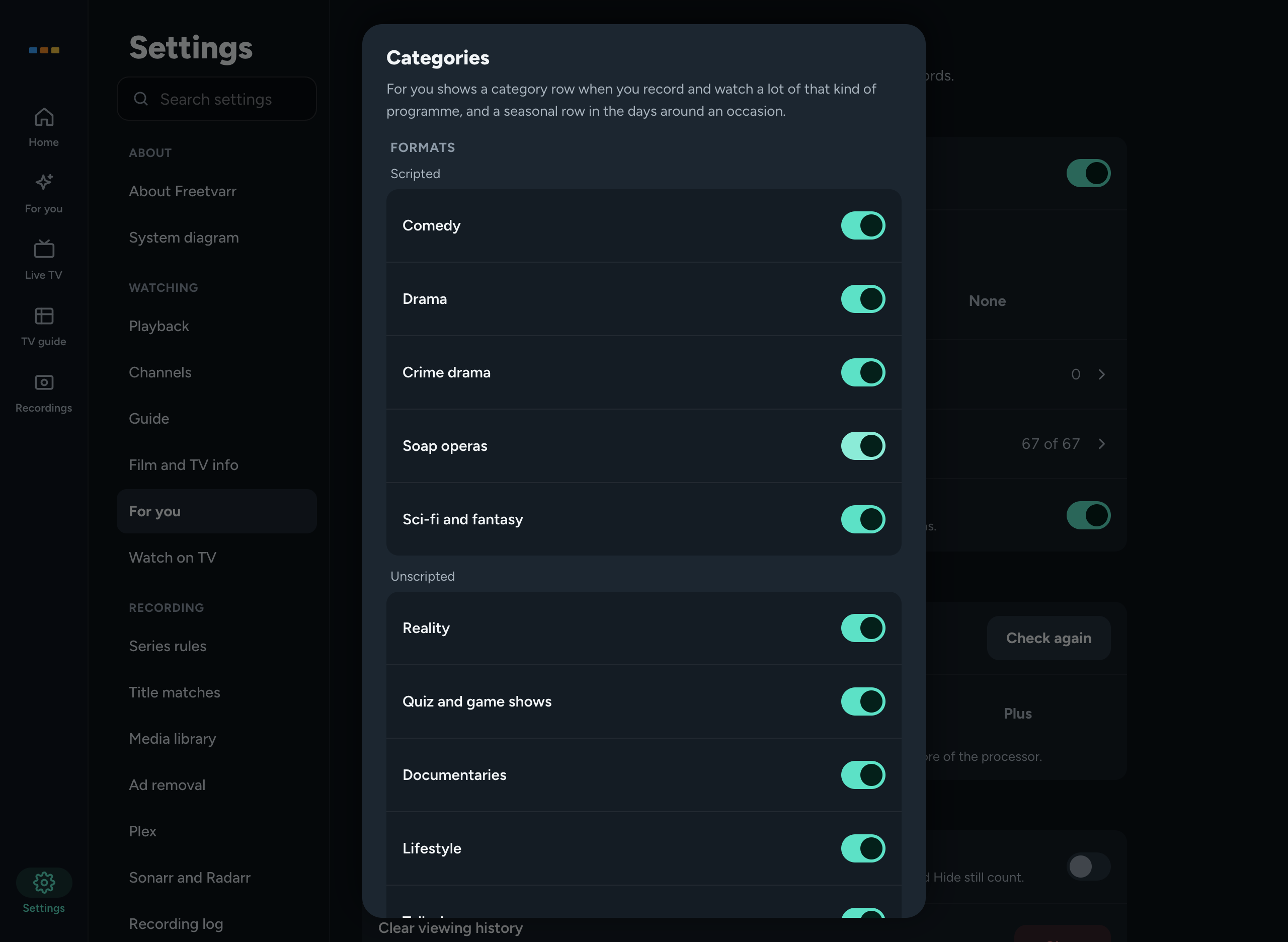
Open Settings → WATCHING → For you, or press the settings button at the top of the For you page.
| Setting | What it does |
|---|---|
| Show For you | Turns For you on or off on Home, in the highlights, and on the For you page. On by default. |
| Animate the For you icon | Plays a short sparkle animation on the For you icon in the menu once each time Freetvarr opens. On by default. |
| Films in other languages | All, A few (the default: up to 2 in each row and 1 highlight), or None of the suggested films first made in a language other than English. |
| Categories | Lists every category in the groups Formats (under Scripted and Unscripted), Topics and Sport (each in A to Z order), and Seasonal (the occasions of your country, in date order through the year), each with a switch, on by default. The count shows how many are on. Turn one off to stop its row; its shows also stop counting towards the rows. A hidden category or occasion shows as off; turn it on to bring the row back. |
| Hidden shows and categories | Lists the categories you hid, such as Fishing shows, in the same order as Categories, then the shows you hid, newest first. Home and For you leave them out. Press Show again to get suggestions for them again. A show you marked Fewer like this before version 2.25.0 stays here until you press Show again. |
| SUGGESTION LEVEL | Auto, Basic, Standard, or Plus. See Suggestion level. |
| Pause history | Stops Freetvarr noting what you watch, until you turn it off. More like this, Fewer like this, and Hide still count. |
| Clear viewing history | Deletes your viewing history, including More like this, Fewer like this, and your hidden shows. Suggestions start again from new. |
Genres, in Settings → WATCHING → Film and TV info, sends show titles to TVmaze and Wikidata to look up their genres, and, with Ratings on, asks TVmaze for the scores of the series it found. Nothing else is sent. It is on by default, and Save settings keeps a change. The same lookups also teach search other titles for your shows.
Suggestion level
The suggestion level decides how much of the processor For you uses:
- Basic compares genres, channels, times, and the words in programme descriptions. It suits any computer.
- Standard adds a small language model (a program that reads text for its meaning) that runs on your computer and compares what descriptions mean, not only their words. Matches are better. Freetvarr picks it when the nightly work takes under about five minutes.
- Plus uses a larger language model. It is slower, so Freetvarr picks it only when the nightly work with it takes under about two minutes.
Auto, the default, picks the level from a short test of your computer. The setting shows the result, such as Standard, detected on this box, and the reason, such as how many seconds a day the work would take. A computer with less than 400MB of free memory stays at Basic. Press Check again to run the test again, for example after a hardware change. To choose a level yourself, press Basic, Standard, or Plus.
The first time it uses Standard or Plus, Freetvarr downloads the language model from Hugging Face into its config folder (${CONFIG_PATH}/freetvarr/models on the host; CONFIG_PATH is set in the .env, see Configuration). After that it works offline.
Viewing history
Freetvarr notes what you watch and record so For you can learn from it: live channels you watch, recordings you play, programmes whose details you open, recordings and series you schedule or cancel, and your More like this, Fewer like this, and Hide choices. The history stays on the computer that runs Freetvarr, in its database. Pause history and Clear viewing history in Settings → WATCHING → For you control it. Pause history still keeps your More like this, Fewer like this, and Hide choices. Freetvarr keeps cards it showed you for 30 days and everything else for up to two years.
Your viewing history never leaves that computer: the lookups send TVmaze and Wikidata show titles only, and Freetvarr has no tracking or analytics.