Sonarr and Radarr
Sonarr and Radarr are apps that download TV episodes and films. They are optional. When Plex is connected, Recordings lists your whole Plex library, including the episodes and films Sonarr and Radarr downloaded. Connect Sonarr and Radarr so that a delete in Freetvarr goes through them:
- When Stop downloading it again is on (the default), Freetvarr asks Sonarr or Radarr to stop monitoring the episode or film.
- Freetvarr asks Sonarr or Radarr to delete the file. The file goes to its recycle bin when the recycle bin is on.
- Freetvarr refreshes the Plex library.
If the delete fails, Freetvarr asks Sonarr or Radarr to monitor the episode or film again (if it stopped monitoring first), and the dialog says that nothing was deleted.
Without a connection, Freetvarr leaves files that Sonarr or Radarr downloaded alone, so they cannot download again behind your back. Files that no app manages, such as Fetch exports or copies you made yourself, are deleted from the disk after a dialog that shows the full path.
Connect Sonarr and Radarr
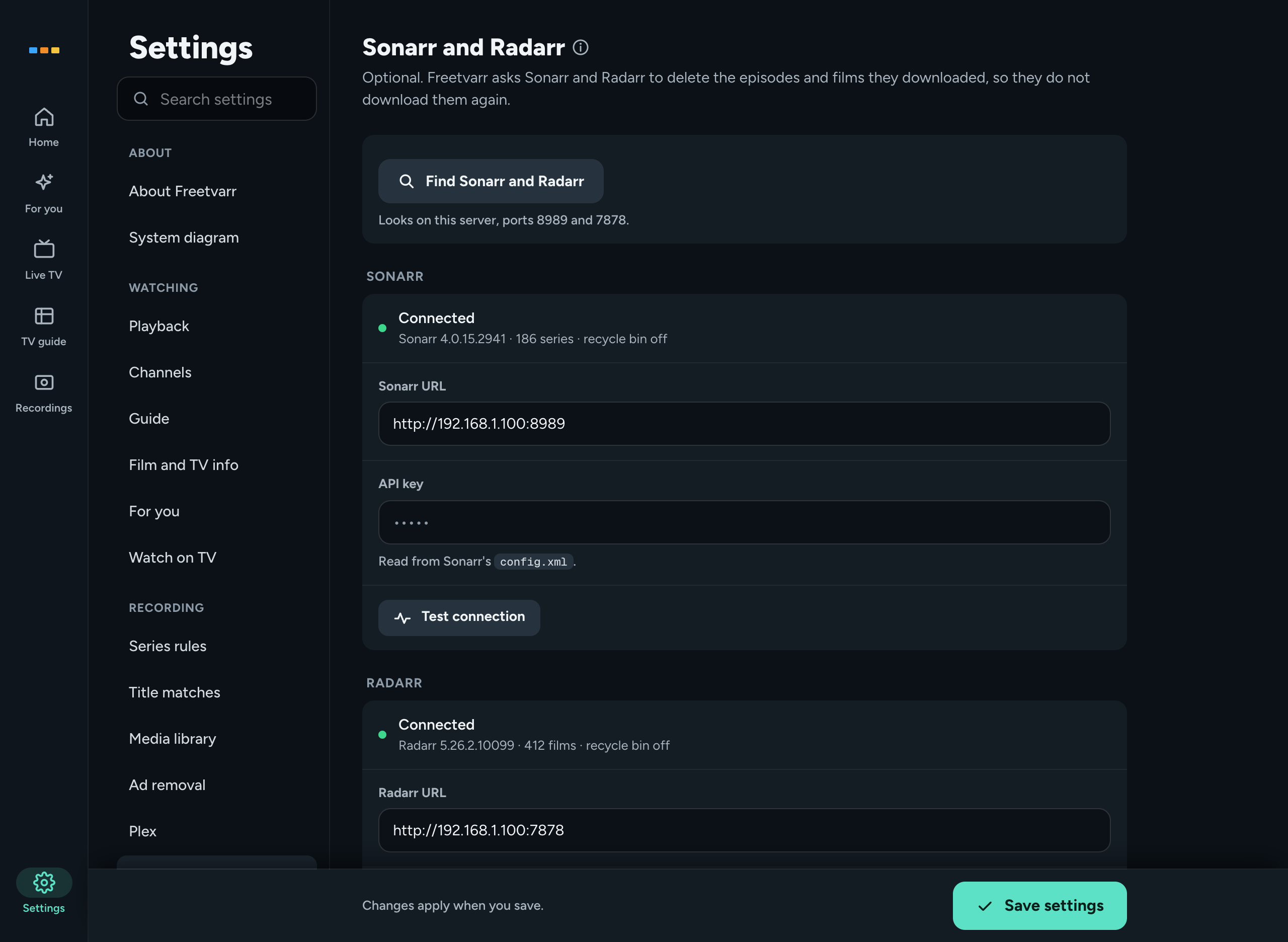
- Open Settings → RECORDING → Sonarr and Radarr.
- Press Find Sonarr and Radarr. Freetvarr looks on its own server, at ports
8989and7878, and fills in each empty address it finds. The line beside the button says what it found, such asSonarr found. Radarr found; paste its API key. - Check the Sonarr URL and Radarr URL. Each is the address you open Sonarr or Radarr at in a browser, such as
http://192.168.1.10:8989. - If an API key field is empty, open Sonarr or Radarr, go to Settings → General, copy the API Key, and paste it into the field.
- Press Save settings.
- Press Test connection under each app.
Connectedshows the version, the number of series or films, and the recycle bin setting.Not connectedshows the reason.
Read the API keys for you
Freetvarr can read each API key from Sonarr's and Radarr's config.xml, the same way it reads the Plex token. The Docker Compose file mounts each file read-only into the Freetvarr Docker container.
Add the host path of each file to the
.envfile beside yourdocker-compose.yml:bashSONARR_CONFIG_PATH=/path/to/sonarr/config.xml RADARR_CONFIG_PATH=/path/to/radarr/config.xmlIn a terminal in the folder that holds your
docker-compose.yml(The compose folder), recreate the Freetvarr Docker container:shdocker compose up -d freetvarr
Under each API key field, Settings then says Read from Sonarr's config.xml. or Read from Radarr's config.xml. Freetvarr uses the key from the file only for an address on its own server at the port in config.xml. A key you paste in Settings wins over the file. If you set the key with an environment variable in Sonarr or Radarr, the file does not hold it, so paste it in Settings.
When you delete
An episode can have two copies: Freetvarr's recording and a file that Sonarr, Radarr, or you added. The delete dialog for that episode asks which to delete: Both, Recording, or the other copy (Sonarr copy, Radarr copy, or Other copy). The dialog lists each file, its size, and whether it goes through Sonarr, through Radarr, or from the disk.
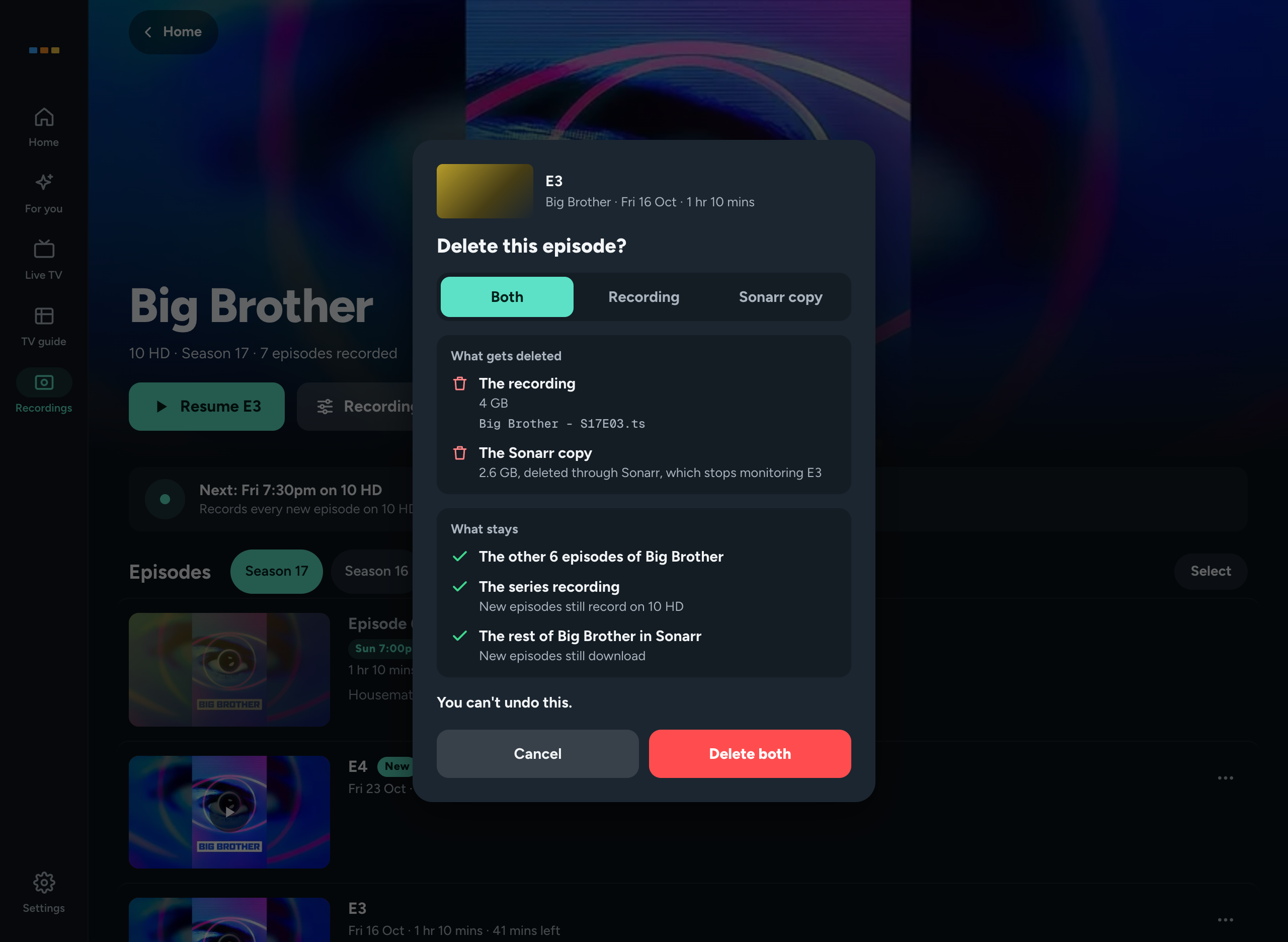
Stop downloading it again, in the WHEN YOU DELETE group of Settings → RECORDING → Sonarr and Radarr, is on by default. Turn it off only if you want Sonarr and Radarr to download a deleted episode or film again.
Delete all episodes on a show that Sonarr downloads also offers Remove the series from Sonarr too. It is off until you tick it. When ticked, Sonarr removes the series and adds it to its import list exclusions (Sonarr's list of series that an import list must not add), so a list does not add it back.
Notes
- Sonarr and Radarr must see the library at the same paths as Plex, or at paths that end in the same show and season folders.
- A file that holds two episodes, such as
S01E01-E02, is deleted once; the dialog lists both episodes. - A file with another hard link on the disk (a second name for the same file data) frees no space when you delete it. The dialog says so.